Keep an eye on your PC

SpyPal is a spying software that is developed by Thinkertec that will let you monitor all activities done on your computer like the programs that have been used and websites that the current PC user has visited. The software also operates stealthily so users will not be aware of its spying. 

Top Recommended Alternative

Stealth mode 

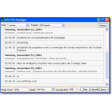
SpyPal is a good way to keep track of all activities that are done on your shared computer. No one else besides you can use, access, and view the activity logs that SpyPal recorded. Its spying will also not be known to other people who use your computer because it operates discreetly and secretly. Some of the activities that you will be able to see are visited websites, downloaded programs, opened files, and even passwords used to log in emails and social media accounts. Aside from screen recording, SpyPal will also take screenshots of your desktop every few seconds. The activity logs can be checked either by accessing the software’s control panel or from the logs that are sent to your email. You can set how regularly you want to receive updates. For instance, you can make SpyPal email you reports every 15 minutes or every hour. To make things more convenient, you can monitor your PC from another device like phones and tablets. 

Stay secure 

SpyPal will help you keep track of what other people do on your computer for security reasons. Some of which are to ensure that employees are working diligently and not taking advantage of company resources, know about the sites that your little children are visiting and prevent them from doing something harmful, and knowing if someone opened and went through your personal files. Most often, SpyPal is used to monitor home-based employees in order to record the time they spent working. Receiving updates from time to time will also make you aware of sudden irregularities and suspicious activities immediately so you will have time to prevent issues from worsening. The software itself is protected by a hotkey that only you will know. Entering the hotkey will reveal SpyPal’s control panel. 

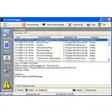
The control panel has icons that sort the different logs SpyPal has recorded. For instance, there is an option for email, which contains all activities concerning emails while the screenshot option will show all screenshots that have been taken by a user. Other logs include Skype chats, applications used, and keystrokes. You can also export or delete all the activity logs if you want to.

Your new pal

Feel at ease and rest easy with SpyPal. It is not complicated and hard to use. Installing and uninstalling is also just a click away. SpyPal can be a very helpful security companion for companies, parents, and other users who share their computer with others.


  • Pros

    • Easy to install
    • Continuous screen recording
    • Timed screenshots
    • Sends activity logs
  • Cons

    • Can be used to invade privacy
    • No back-up hotkey or password
    • Hotkey cannot be recovered
    • Old-school interface design

App specs

Program available in other languages


Icon of program: SpyPal

SpyPal for PC

  • Free
  • 4.4
    350
  • 48K
  • V11.110

User reviews about SpyPal

4.4

6 reviews

Add review

Main reviews for you

  • Anonymous user

    Perfect keylogger for employee monitoring. helps me spy on my employees to make them more focused and efficient in their work or to increase productivity. Easily track work time and active applications, take screenshots and log activity data. Pros: powerful skype monitoring featurework for both office and home

  • Anonymous user

    Great program for what it does. Does just what I want and my son does not even know I am doing it. Happy to say i found what i needed, the program looks basic which makes it simple to use but was pretty good at getting the info i needed to protect my kid Pros: wonderful screen recording and keylogger feature

  • Anonymous user

    Help productivity by monitoring employees. . employees kept deleting history and cache to avoid being caught. this program catches everything even web surfing history is erased.

  • Anonymous user

    All in one monitoring product. Monitored everything I needed. I needed more than just a keystroke logger as I want to see all types of activity. This program is an all in one monitoring solution so that it helped to make my decision easier.

  • Anonymous user

    Exactly what i need. it is a very useful tool to monitor my kids. i have been using this for years and don't want to try another keylogger because it's just exactly what i need. Pros: stealthyeasy to use Cons: can't not think of at this moment.

  • Anonymous user

    Is not free. is not free, you have an icon on the desktop until you pay 41 gbp, and every restart ask you to buy the software. Pros: is not free Cons: is not free

More

You may also like

Alternatives to SpyPal

Explore Apps

Latest articles

Laws concerning the use of this software vary from country to country. We do not encourage or condone the use of this program if it is in violation of these laws.
Softonic

Is SpyPal safe?

80/100

Score result: Warning

This file has been flagged as potentially harmful or containing unwanted bundled software. Please proceed with caution.

  • Virus free
  • Spyware free
  • Malware free
  • Verified by Security Partners

    VirusTotal logo

Scan Info

Last scan
Tuesday, April 23, 2024
Scan provider
VirusTotal · Full report

File Integrity

File
setup.zip
SHA256
0ce9b7d9cbe9e2ded1474150aa3cb1c2d40021f4645f53c56198d3d69b924fd9
SHA1
d844a441a9df3207706050aa30dbd456cf89a3d3

Softonic security notice

This software has been thoroughly scanned by our advanced security systems and verified by industry-leading partners. However, one or more antivirus engines have flagged this software with potential risks. While these detections may be false positives, we recommend caution when downloading and installing. Some programs may include unwanted software or behaviors that could affect your device. False positives can occur when safe software is mistakenly flagged as harmful due to overly cautious detection rules or algorithms in antivirus tools. This means the program may still be safe to use, but we advise reviewing the details before proceeding.